
During upload, Everlaw detects metadata fields that refer to the same underlying concept, and groups them together. The title of the field that Everlaw groups them under is then used as the search and display name across the database.
Standard fields are the forty or so most common metadata fields. For example, all variations of the custodian field (“Custodian”, “Custdn”, “CUST”, etc.) get grouped into the “Custodian” field, which is a standard field.
Use this article to understand the standard fields and how to work with them on Everlaw.
Standard fields typical meaning and usage
For native uploads, mapping and grouping to standard fields happens automatically during upload. For processed uploads, the user doing the upload reviews and confirms Everlaw's suggested metadata field titles in the metadata mapping step.
The standard fields are listed below along with typical meaning and usage. The example field names and values are for reference for when you are doing a processed upload.
| Field name in Everlaw | Common definition and notes | Example field names | Example values | Typical data type |
| All Custodians | The custodian(s) of the document in question, as well as custodians of duplicate docs generated from deduplication. Custodians are typically separated by commas in Everlaw; other systems may use semicolons instead. |
All Custodians, Custodians, Custodian List |
Michael Gonzalez, Li Cheng | Text |
| All Paths | The file paths of the document and all of its duplicate documents as they were stored in the Custodian’s directories. File paths are separated by semicolons. | Duplicate Custodians Directory Path, All Paths, All File Paths | C:\Users\MikeG\Documents\Reports.xls; | Text |
| Application | The native application in which a file was created. |
Source Application, App Name, Application |
Excel Microsoft Word 95 Adobe Photoshop |
Text |
| Attachment IDs | A list of Bates numbers or other numeric IDs of all child documents for attachment grouping. |
Attachment Bates, Attach List Attach IDs, Attach Bates, Child Bates |
LAW0022, LAW0024, LAW0028 | Text |
| Attachment Names | A list of the original native file names of attachment documents. |
Attachments AttachmentNames AttachList |
cat.gif, deletesearches.msg | Text |
| Author |
The document’s author.
Some producing parties will also use the field “Last Author” to indicate the most recent custodian to save a copy of the file. If both fields are present, consider creating a new non-standard metadata field, “Last Author.” |
Author Auth, Last Author |
Michael Gonzalez | Text |
| Bcc | The “Blind carbon copy” recipients from an email, which is not visible to the other recipients. |
Bcc Email Bcc |
Michael Gonzalez <michael.g@example.co>, Li Cheng <Li.C@example.co> | AddressList |
| Begin Family |
A Bates number that corresponds to the first page of the document’s parent. For example, an email attachment will have a Begin Family value that corresponds to the parent email’s Begin Bates number. If a document is the parent of an attachment family, Begin Family will match Begin Bates.
By default, Everlaw uses this field and “Family” to identify attachment families. |
Beg Att, Family Start, ProdBegAtt, BegAttach, Begin Attachment, Production Bates Begin Attach |
ABC00123 | Bates |
| Cc | The secondary recipients of an email. These recipients are visibly listed to all other recipients, and receive a “carbon copy” of the email. |
cc CC COPIED |
Michael Gonzalez <michael.g@example.co> | AddressList |
| Chat attachment ID | The unique identifier for a file attached to a chat message. Everlaw uses it to associate an extracted attachment with the chat document or message that references it. | ID | 8d710ac567257b3de16f34a883d537d6151e54b4 | Text |
| Chat contributors |
A comma separated list of the participant list, which can include either only the active participants or all users listed for the chat, depending on the type of chat. Slack channels include the people who actively participated in the chat segment
Slack group chats and DMs include all members in the chat. |
n/a | Michael Gonzalez | Text |
| Chat conversation Id | The conversation's identifier (e.g. #general) | n/a | C01FFDNLFLB |
Text |
| Chat conversation index | The document's index within a conversation, if the conversation is split into multiple documents | n/a | 1 | Number or Range |
| Chat message count |
The number of messages in chat documents (segments). You can use this field to search chats by an exact message count or range, allowing you to quickly spot unusually long or short chat segments, prioritize dense chats for early review, and build more targeted samples by searching on an exact message count or a range.
|
n/a | 2 | Number |
| Confidentiality | Denotes the confidentiality of the document. |
ConfDesgn Designation Desig Confidential |
HIGHLY CONFIDENTIAL | Text |
| Custodian |
The person the file was originally collected from. It may also list the owner of the device from which the document was collected. This term is case-sensitive in searches. |
Custodian, Custod, Cust, Source/Custodian |
Li Cheng | Text |
| Custom all custodians | A field for manually supplied custodian values during an overlay. Using Custom All Custodians allows you to update custodian information without replacing the existing Custodian or All Custodian values. It is not the field Everlaw normally updates with future native-upload deduplication information | Custodian | Kevin; Anna | Text |
| Data Type | For natively uploaded Google Vault data only. It is from the files' path and represents the broad category of data or document represented, such as an email, chat, spreadsheet, or PDF | Data Type, Document Type, Type | Email, Chat, Spreadsheet, PDF | Text |
| Dataset |
The production or upload in which the file was added to Everlaw.
Because Everlaw uses “Dataset” for native data, it is sometimes appropriate to map this metadata to “Volume” or “Production Volume” when received from outside parties to avoid conflicting usages for this field. |
Dataset |
PROD003 VOL01 |
Text |
| Date |
A generic field for DateTime values that don’t contain any modifier/qualification.
It is generally not advisable to map “Master Date”, “Sort Date”, etc. to this catch all Date field; those fields should be given their own new non-canonical field names. |
Date DateTime |
4/30/17 6/8/2006, 21:00 |
DateTime |
| Date Accessed | The date the document was accessed or opened electronically. |
DATE_LAST_ACCESS DATE_ACCSD |
4/30/17 6/8/2006, 21:00 |
DateTime |
| Date Created | The date the document was created. |
CREATED_DATETIME TIME/DATE_CREATED |
4/30/17 6/8/2006, 21:00 |
DateTime |
| Date Modified | The date that the document was last modified (i.e. changes were applied and save to the document). |
LastModified ModificationTime DATEMOD LAST_MODIFY_DATETIME LASTWRITETIME |
4/30/17 6/8/2006, 21:00 |
DateTime |
| Date Printed | The date document was printed | Print Date, Date Printed, DtPrnt |
4/30/17 6/8/2006, 21:00 |
DateTime |
| Date Received | The date that the document was received. For emails, this is the time that the email reached the inbox of the individual in the “To” field. |
DATERCV RCV_DATE |
4/30/17 6/8/2006, 21:00 |
DateTime |
| Date Saved | The date that the document was saved. |
SaveDate Last Saved Date |
4/30/17 6/8/2006, 21:00 |
DateTime |
| Date Sent | The date that the document was sent. This is usually used in emails. |
SEND_DATE DateSent |
4/30/17 6/8/2006, 21:00 |
DateTime |
| End Date |
This field is used for calendar events, and indicates the conclusion of an event. For chat documents, this is the timestamp of the last message in the chat segment |
ENDDATE, DTEND |
4/30/17 6/8/2006, 21:00 |
DateTime |
| Start Date |
This field indicates the start time of a calendar event. For chat documents, this is the timestamp of the first message in the chat segment. |
STARTDATE, DTSTART |
4/30/17 6/8/2006, 21:00 |
DateTime |
| Document Type |
Typically a generalized description of the file type, e.g. Email, PDF, Spreadsheet, Microsoft Word Document, Video, Audio, Plain Text, etc. While some producing parties will use “Document Type” and “Record Type” interchangeably, other parties may use Record Type to indicate the form of media from which the document was collected (“E-file”, "E-DOC", “Hard Copy”, or “Email” If so, it should not be mapped to Document Type. |
DocType RecordType |
Spreadsheet |
Text |
| Encrypted | A True/false/yes/no value indicating if the document’s files were encrypted |
Encrypted IsEncrypted |
TRUE Y N False |
Text |
| End Family | The End Bates of the last attachment in an attachment family. |
ProdEndAttach END_ATTACH FamilyEnd EndProdAttach EndAttach |
ABC00555 | Bates |
| Endorsed Text | Created during a production on Everlaw. It is text added to a document image as an endorsement during production, such as a confidentiality label, Bates-related text, or other configured production text. | CONFIDENTIAL; Produced by Everlaw | Text | |
| Extension | The extension of the native file. Columns named “File Type” or Document Type will sometimes contain extension values; in this case, it is typically advisable to map this fields to “Extension” to ensure easier metadata searching. If it is unclear which field contains the file’s extension and which field contains information on the application used to create a file, it is recommended that you confer with the producing party for clarification. |
Ext FileExt DocExt File Type Document Type |
gif doc eml xls kmz kml |
Text |
| Family |
A single Bates number, other numeric ID, or range that identifies a document’s attachments (family).
When Family is a range of Bates numbers, it typically starts with the Begin Bates value of the highest level parent document of the attachment family and ends with the End Bates of the last child document in the attachment family. In situations where a document has multiple levels of attachments, the beginning of the Family range may refer to a parent or grandparent document.
Fields with names such as Group ID or Family ID, even if they resemble a Begin Family value, are typically best mapped to Family, and not to Begin Family.
Family is generated on ingestion for native data and is used for attachment grouping for native data by default in Everlaw.
*Note: A list of Bates numbers of attachments should be mapped to Attachment IDs instead of Family |
Group Id Family Family ID |
RAY007
# only examples: 30491084 00001 00002 90001 90002 |
Text |
| File Path |
Either used as the directory path of the file on the custodian(s) machine(s) at the time of collection, or is the directory path of the native version of the document within the production. Information mapped to this field displays in Everlaw’s file path explorer.
If this field contains the directory path on the custodian’s machine, it is advisable to map it to File Path. If it instead contains information about the file path within the production itself, such as “natives/ABC001.xls”, then it should be mapped to the “Native Path” field when choosing identity fields of a processed upload, and not be mapped to File Path. In such cases, producing parties often provide the Custodian’s file path information in the “Original Path” field, which should ideally map to “File Path” to benefit from Everlaw’s file path explorer functionality. |
Path FilePath Original Path |
Users/LiCheng/pictures/myimage.jpg | Text |
| Family Range | A list of Bates numbers of attachments that represent the entire range of a family |
FamilyRange AttRange AttachRange |
ABC0055-ABC0123 | Text |
| Filename | The name of the native/original file; the file-extension may or may not be included. | FILENAME | example.gif | Text |
| From | The sender of an email |
EMAIL_FROM From |
Li Cheng <Li.Cheng@example.co> | AddressFrom |
| Handwriting | Indicates whether handwriting was detected when a document was reprocessed with the OCR optimized for English handwriting option. The field is populated with Yes or No for successfully reprocessed documents; it is blank when that processing option was not run or did not complete successfully. | Yes, No | Text | |
| Has OCR | A true/false/yes/no value indicating whether the document was OCR’ed. | OCR |
True False Yes No |
Text |
|
Has PDF Comments
See the Has PDF comments section below for more information about this field |
A yes/no value indicating whether a native PDF file has comments.
|
Yes No No Value |
Text | |
| Hash value |
A unique digital identifier for the document. Parties should confer to specify whether this field will be MD5, SHA1, or use another custom hashing method.
If the data is identified as MD5 or SHA1 format, this can also be mapped to “MD5 Hash” or “SHA1 Hash.” |
Hash Value Hash |
Text (Only if MD5 or SHA1 are not possible.) | |
| Hidden Content |
A True/False/Yes/No value indicating whether the document contains hidden content.
Everlaw generates this field during the processing of native data to indicate there was hidden content for a field. |
Hidden_Content
HasHiddenContent |
True False Y N |
Text (Yes/No) |
| In Reply To | An optional email metadata field. If used, The "In-Reply-To:" field will contain the contents of the "Message-ID:" field of the message to which this one is a reply (the "parent message"). If there is more than one parent message, then the "In-Reply-To:" field will contain the contents of all of the parents' "Message-ID:" fields. If there is no "Message-ID:" field in any of the parent messages, then the new message will have no "In-Reply-To:" field. |
Reply To, In Reply To |
Text | |
| Languages |
An Everlaw-generated field based on the list of “Expected Languages”, which users add to in Language Tools settings.
Everlaw staff generally avoid mapping any field to “Languages” during processed uploads in order to avoid overwriting the languages identified by Everlaw’s automatic language detection tools. |
Languages | Text | |
| MD5 Hash | A 32 character hash value consisting of the characters A-F and 0-9. It is used to identify duplicates on the platform |
Hash MD5Hash Checksum Fingerprint |
e8102b011ed112bcd77e745c2ba92ea6 | MD5 |
| Message ID |
An email field, used to reconstruct email threads, MessageID is a unique machine-readable identifier of a particular instance of a particular message
Message ID to be confused with the non-canonical field “Internet Message Id” or “IntMsgId”, which should be mapped to New/Semantic fields. |
MsgID | Text | |
| Mime Type |
A standard that indicates the nature and format of a document, file, or assortment of bytes.
The simplest MIME type consists of a type and a subtype; these are each strings which, when concatenated with a slash (/) between them, comprise a MIME type.
Example: text/html, text/plain, video/mp4 or application/pdf |
Mimetype, Mime | video/mp4 | Text |
| Original Filename | Refers to the filename as it occurred on the custodian’s machine. |
ORIG_FILENAME Original_Filename OriginalName |
QuarterlyReport.docx | Text |
| Original Path | While this is a common field type in external productions, it should generally be mapped to “File Path” on Everlaw to benefit from Everlaw’s file path explorer functionality. This field is usually used when external productions reserve “File Path” for the path of the native file within the production, such as “natives/ABC001.xls.” In such cases, “Original Path” should be mapped to “Native Path” as an identity field. |
Text | ||
| Other Bates |
Used in Everlaw to list alternative Begin Bates numbers of a document. If you use the Bates search term, it will also search against this field. If a producing party needs to reproduce a document to a new Bates number, they can use this field to list all of the prior Bates numbers the document was produced to. |
OtherBates PreviousBates |
XYZ001 | Bates |
| Other Custodians |
A list of additional custodians outside of the primary custodian.
This should not be confused with All Custodians. Use Other Custodians when the field’s name or ESI protocol does not suggest all custodians are present. |
Other Custodian, Duplicate Custodians, Additional Custodians, Dedupe Custodian |
LiCheng, Mark Rose | Text |
| Parent ID |
Refers to the Begin Bates of the parent for a specific document. In a load file, this is different from Begin Family, which refers to the Begin Bates of the highest parent document of an attachment group. For example, if ABC001 has an attachment ABC002, and ABC002 has an attachment ABC003, then the Parent ID of ABC003 would be ABC002 because ABC002 is the parent of ABC003. However, the Begin Family of ABC003 would be ABC001, as that is the first document in the attachment family tree. Parent ID is also an Everlaw-generated field for natively uploaded files. Parent ID refers to the Begin Bates of the direct parent for a given document. |
Parent Bates, Parent ID |
ABC002 | Bates |
| Placeholder |
A boolean yes/no value indicating if the images for a document are placeholder images. These are sometimes alternatively referred to as “slipsheet” images. Slipsheets and placeholders are commonly used to indicate that a document was produced in native format or that a document could not be converted to a PDF/TIFF image due to technical limitations. |
Has Placeholder, Placeholder, Slipsheet | Y | Text (Yes/No) |
| Placeholder Text | Contains the text on the face of the placeholder image(s) for a document | Placeholder Text, Slipsheet Text | Produced In Native Format | Text |
| Privilege Type | Used to list the reasons that privilege has been asserted for a document. | Privtype, Privilege Type, Privilege Reason, Withheld Reason | Attorney Client | Text |
| Produced From | The document ID of the pre-production version of this document. In Everlaw, this field is used for version grouping of pre/post-production docs. This is a field Everlaw produces for the purposes of production QC; it is not typically seen in load files sent to external parties. This field might be included in internal-only productions or co-counsel productions when it is necessary to know the original-record’s pre-production document ID (i.e. the “#” number in Everlaw). | Produced From | #1.1 | Bates |
| Redacted | Indicates whether the document contains a redaction. A value may be present even when no redaction stamp was applied. | Redacted, Is Redacted | Yes, No | Text |
| Redaction Stamp Details | Details redaction stamp page locations, redacted metadata field names, and whether the stamp was applied to native redactions | Page 1: PII; Page 3: Privileged | Text | |
| Redaction Stamps | The redaction stamps used in the document | Redaction Stamps, Redaction Stamp, Stamp Names | PII, Privileged | Text |
| Split From | Used for documents that have been split using a unitization tool or PDF-splitting application, this field lists the document ID/ Bates of the document from which this document’s images were split off. For example, if a 3 page document was split into ABC001, ABC002, and ABC003, then each of those documents would have a value of “ABC001” in this field. | Bates | ||
| SHA1 Hash | A 40 character hash value consisting of the characters A-F and 0-9. It is used to identify duplicates on the platform |
Hash SHA1 Hash |
3ca9195f1bf53cffbf63c1cafcf2a7df839b3844 | SHA1 |
| Speaker Notes | Generated during processing of native data for docs (mostly presentations) that have speaker notes. | Text | ||
| Subject | An email field, the subject of the email | Subj, Subject | “10 reasons to delete searches you’ll have to SEE to believe!” | Text |
| Tags | A source-file label or keyword extracted as metadata, especially from supported forensic exports such as Cellebrite. This is metadata from the source data and is distinct from Everlaw review codes. | Tags, Tag, Keywords | Important, PII | Text |
| Tick No | Tick No is a specialized metadata field used for certain Google-originated data collections. It stores a collection tracking identifier when that identifier is present in the source folder structure. | tick-12345 | Text | |
| Title | The title of a document | Document Title, Title, Doc Title | Text | |
| To | Sometimes a load file may contain multiple To fields with different formatting, (see next column). Choose the most inclusive field for the To field (the one that contains names and addresses). It may be necessary to map the other columns to “To (Names)” and “To (Addresses)” respectively. The same can be applied to the From, Bcc, and Cc fields. |
To, To Names, To Addresses |
AddressList | |
| Track Changes | Indicates whether a doc has track changes present. It is typically a yes/no value. | Translated, Trans, Translated Doc ID, Translated From | Y | Text |
| Translation Of | Indicates that this document is a translation of the specified document. | Text | ||
| GPS Longitude | Indicates the longitude of the geographical location | Longitude, long, GPSlongitude | 121 deg 56' 51.28'' W | Text |
| GPS Latitude | Indicates the latitude of the geographical location | Latitude, lat, GPSlatitude | 37 deg 34' 33.27'' N | Text |
Standard fields and searching
Using a standard field as a search term searches across all the fields grouped under that particular field name. This makes it much easier to search across documents with synonymous fields.
See original fields in the review window
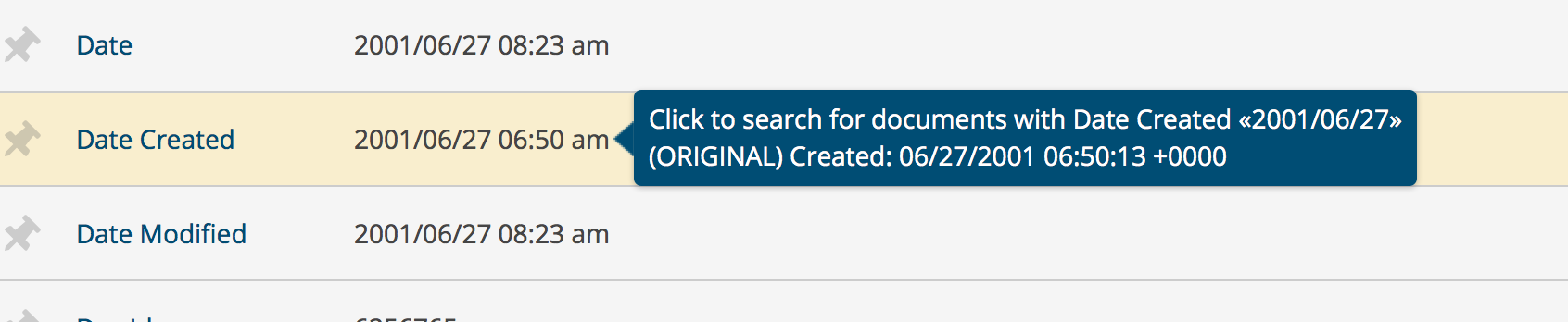
While looking at the metadata panel in the review window, you can see the original field name (from a load file) of a given field. To do so, hover above the value for any displayed metadata field. For example, in the image below, the standard “Date Created” field has replaced the original field name, “Created”.
'All Custodians' behavior
There are a few nuances you should be aware of when working with the "All Custodians" field.
For native data:
- Generally, the "All Custodians" field is inclusive of the "Custodian" field value for any given document in a native upload.
- When uploading native data, this field is auto-populated with all custodian values associated with a document, unless a document is a duplicate that has not been deduplicated (as outlined below).
- Everlaw only updates the "All Custodians" field upon deduplication. If two documents with different custodians are processed and not deduplicated, they won't have each other's custodian values in the "All Custodians" field unless and until they are deduplicated.
- For example, if document A was found in datasets for custodians Mario and Luigi, the "All Custodians" field won't contain both Mario and Luigi unless and until the documents are deduplicated.
For processed data:
- When uploading processed data, this field is populated with the values provided in a given load file. Because Everlaw only takes the values as given in a processed upload, there can be situations where (1) the "All Custodians" field is not inclusive of the "Custodians" field or (2) the "All Custodians" field is empty for a given document even though the document has a "Custodian" value.
- The value of "All Custodians" for a processed upload or overlay is stored and parsed as a single string instead of a list of discrete values. This affects how you should search across this field: unlike when searching across native documents, you should turn off "exact" matching to retrieve documents where the "All Custodians" field contains the value you are searching for.
Has PDF comments
PDF comments are not viewable on Everlaw, so this field is useful for identifying documents that should be reviewed offline. The value is captured for natively uploaded documents and for processed documents that include a native PDF file. The Has PDF comments term is designed to extract information about comments made using Adobe Acrobat, but comments (notes) from other tools, such as Preview, can also be captured.
For databases created after May 13, 2026, the field is automatically available upon upload.
For databases created before this date, please follow these steps to enable it:
- Contact support@everlaw.com and request that they enable the Has PDF comments metadata field.
- Once it's enabled, you can reprocess all the existing PDFs to capture their value for the Has PDF comments metadata field.
- Any new documents you upload will automatically have their value extracted for this field.